Showing posts with label photography. Show all posts
Showing posts with label photography. Show all posts
Tuesday, November 19, 2013


Wednesday, September 04, 2013
Fake Canon Flash
Hey Photo Enthusiast. Follow the link to an unbelievable read about a Canon Fake Flash. Not just any model but an EX 580 II >> Story of a fake Canon Flash @ PetaPixel
Ten years ago I flew to Hong Kong just to pick up my photo gear, man this news is just off!

Ten years ago I flew to Hong Kong just to pick up my photo gear, man this news is just off!

image source is the article linked above
Saturday, August 31, 2013
Good Mouse for Photoshop
Which mouse is a good Photoshop Mouse? Simple answer:
Your best gaming mouse is also your best Photoshop mouse.
That is because gaming mice come with many fully configurable buttons and feature an ergonomic form for long sessions, they are precise and have durable build quality.
Remember: good mice and good keyboard boost your productivity more than a faster CPU does. So don't be obsessed on saving money when it comes to the mouse!
When working through series of pictures the right commands on the mouse can easily save you many hours of time!
Currently my favorite mouse for work is the Logitech G700. It's fully customizable and all buttons are placed where I like 'em.

The general approach to assign the mouse with actions:
- understand that this topic is highly individual
- observe your own Photoshop usage closely
- take notes of the actions you perform the most in your workflow
- decide which actions you want to access with a mouse click
- look up the corresponding keyboard shortcuts here or just google them
- configure your mouse , sometimes it's possible to form groups of actions (ie always the same 3 actions for picture tweaking form a cluster, place them on button G8 > G9 > G10)
- create a cheat sheet because things might be hard to memorize in the beginning
> get inspiration from the net! to tune up your workflows
Other tools which might make your Photoshop life easier are:
- a Surface Pro as an affordable alternative to the very expensive Wacom Cintiq
- a must: wacom tablet ($100+) for retouching and painting
- keyboard stickers for professionals (not for me, because I use around 15 shortcuts only)
- a gaming keyboard where you can assign more functions to shortcut keys (not for me either because they look childishly ugly most of the time)
- your tablet > see this older video. I don't have any experience with this

Your best gaming mouse is also your best Photoshop mouse.
That is because gaming mice come with many fully configurable buttons and feature an ergonomic form for long sessions, they are precise and have durable build quality.
Remember: good mice and good keyboard boost your productivity more than a faster CPU does. So don't be obsessed on saving money when it comes to the mouse!
When working through series of pictures the right commands on the mouse can easily save you many hours of time!
Currently my favorite mouse for work is the Logitech G700. It's fully customizable and all buttons are placed where I like 'em.

The general approach to assign the mouse with actions:
- understand that this topic is highly individual
- observe your own Photoshop usage closely
- take notes of the actions you perform the most in your workflow
- decide which actions you want to access with a mouse click
- look up the corresponding keyboard shortcuts here or just google them
- configure your mouse , sometimes it's possible to form groups of actions (ie always the same 3 actions for picture tweaking form a cluster, place them on button G8 > G9 > G10)
- create a cheat sheet because things might be hard to memorize in the beginning
> get inspiration from the net! to tune up your workflows
Other tools which might make your Photoshop life easier are:
- a Surface Pro as an affordable alternative to the very expensive Wacom Cintiq
- a must: wacom tablet ($100+) for retouching and painting
- keyboard stickers for professionals (not for me, because I use around 15 shortcuts only)
- a gaming keyboard where you can assign more functions to shortcut keys (not for me either because they look childishly ugly most of the time)
- your tablet > see this older video. I don't have any experience with this
Here's my own cheat sheet from 2008 / Photoshop CS3
(uhm shortcut missing is Ctrl+T to show layer handles)

Sunday, September 14, 2008
Canon EOS 50D - 40

Summary of the main differences between the recently released Canon EOS 50D and the 40D owned by some of us. Taken from the dpreview spec sheets.

Sunday, November 04, 2007
Canon EOS 40D

Well you've probably read about the breathtaking feature list of the Canon EOS 40D. I was reluctant to post anything here, since simply everyone was praising the camera so much. Finally I found quite a balanced read (go for the conclusion) here.
If you're not waiting for the Canon EOS 5d follow up, if full format sensors are not your thing - then get the 40D right away.
[Update August 2008:] meanwhile I bought the camera too. The cam is close to perfect for my use, the price was right and I was not willing to pay more for a 50D.
Wednesday, February 22, 2006
Canon EOS 30D
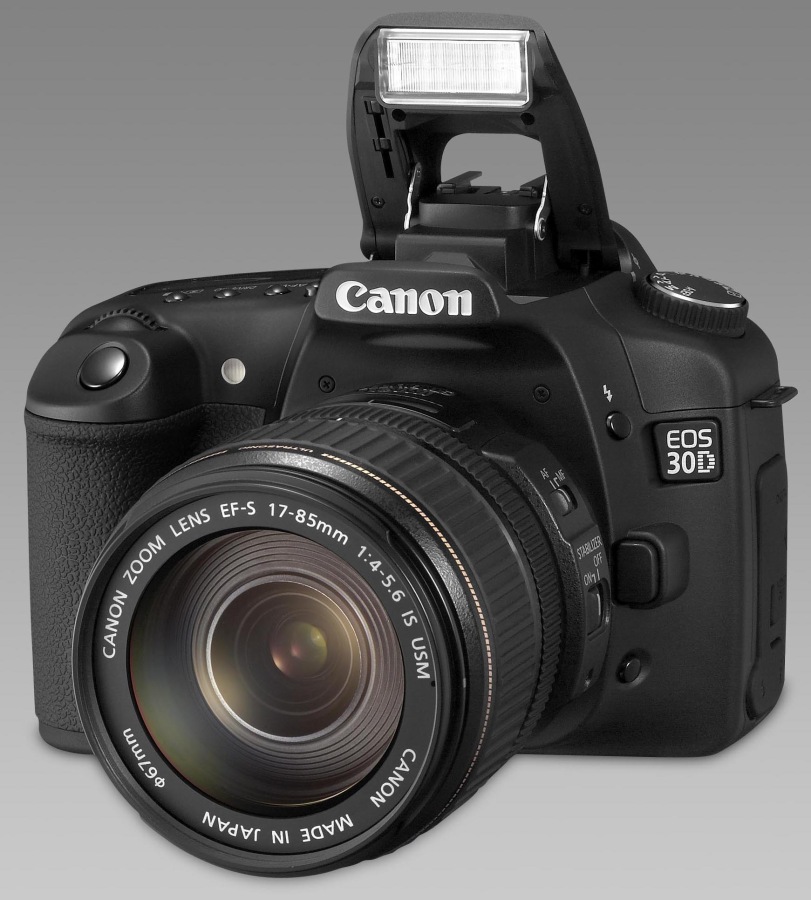 New Canon EOS 30D (8 Megapixel) to replace EOS 20D. Not so much changes though. Spotmeetering is now available the image cache can hold 11 RAW pics (highest resolution). Of course Canon also enlarged the backside display - it's a standart 2.5" now. read more about the camera here
Friday, October 21, 2005
Canon EOS 5D
 Fullformat Sensor and everything else one would wish for (except a built in flash) Infos: dphotojournal / dpreview / picture @ ISO 3200 WOW! This would be my joice if I wouldn't already own a dSLR.
Subscribe to:
Posts (Atom)