| browse: mobile | android | pc hardware | firefox | fun | music | .
Showing posts with label Logitech. Show all posts

Saturday, August 31, 2013

Good Mouse for Photoshop

Which mouse is a good Photoshop Mouse? Simple answer:
Your best gaming mouse is also your best Photoshop mouse.

That is because gaming mice come with many fully configurable buttons and feature an ergonomic form for long sessions, they are precise and have durable build quality.

Remember: good mice and good keyboard boost your productivity more than a faster CPU does. So don't be obsessed on saving money when it comes to the mouse!
When working through series of pictures the right commands on the mouse can easily save you many hours of time!


Currently my favorite mouse for work is the Logitech G700. It's fully customizable and all buttons are placed where I like 'em.


The general approach to assign the mouse with actions:

- understand that this topic is highly individual
- observe your own Photoshop usage closely
- take notes of the actions you perform the most in your workflow

- decide which actions you want to access with a mouse click
- look up the corresponding keyboard shortcuts here or just google them
- configure your mouse , sometimes it's possible to form groups of actions (ie always the same 3 actions for picture tweaking form a cluster, place them on button G8 > G9 > G10)
- create a cheat sheet because things might be hard to memorize in the beginning

> get inspiration from the net! to tune up your workflows


Other tools which might make your Photoshop life easier are:
- a Surface Pro as an affordable alternative to the very expensive Wacom Cintiq
- a must: wacom tablet ($100+) for retouching and painting
- keyboard stickers for professionals (not for me, because I use around 15 shortcuts only)
- a gaming keyboard where you can assign more functions to shortcut keys (not for me either because they look childishly ugly most of the time)
- your tablet > see this older video. I don't have any experience with this


Here's my own cheat sheet from 2008 / Photoshop CS3
(uhm shortcut missing is Ctrl+T to show layer handles)


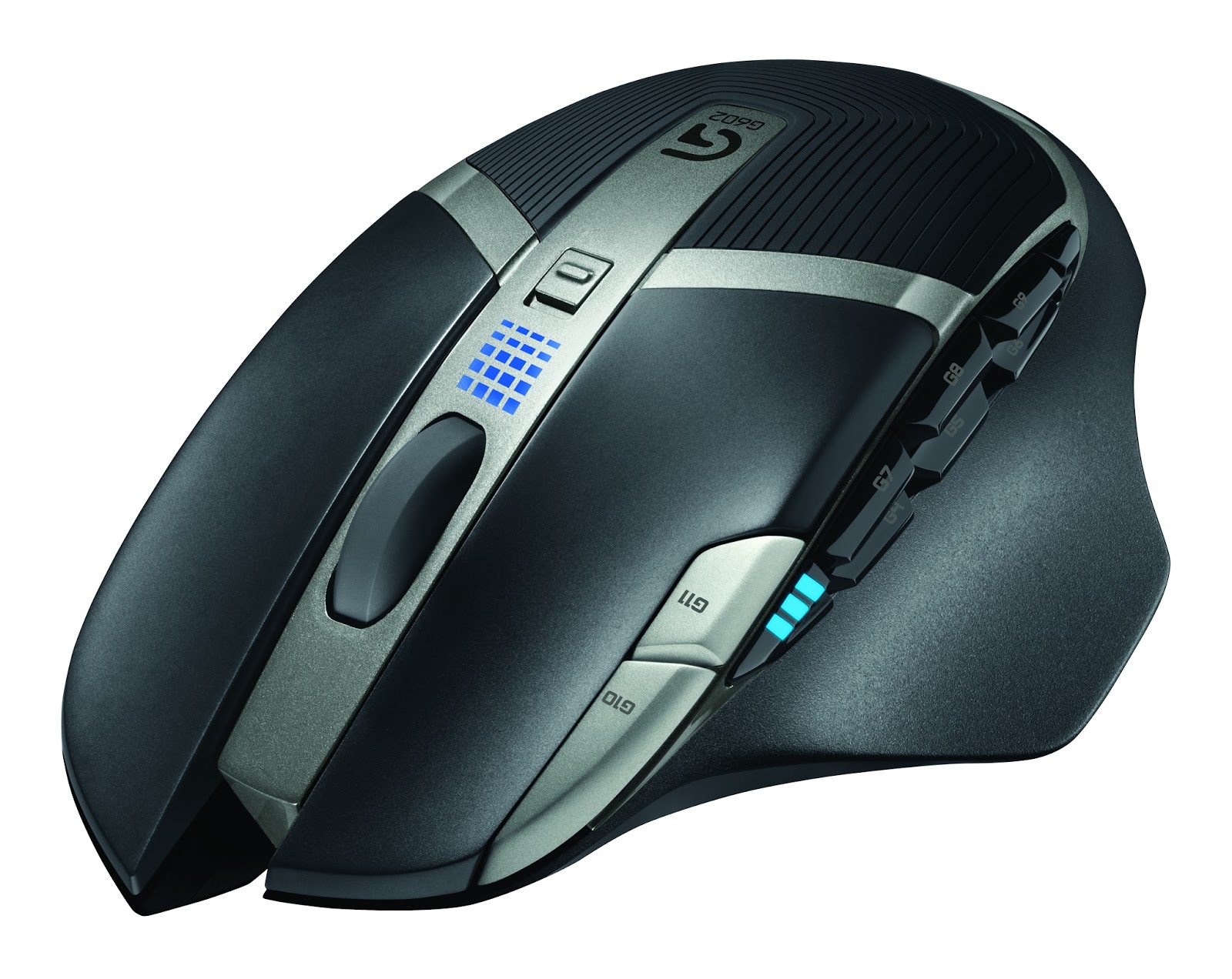
Logitech G602 Mouse announced

Some of you know that I use Logitech mice since 20 years now. To me the G700 and the Performance MX are close to perfect productivity boosters. The buttons are at the right place, the scroll wheel is phenomenal, the G700 driver an absolute charm.
Therefor I was rather excited to read about the new Logitech G602 mouse! Unfortunately the more I learn, the less happy I feel about the new product. First some pictures, then I'll explain.


source of all images above: logitech.com


My thoughts are:

+ many buttons
+ driver will allow full customization of all buttons
+ looks good and seems to feel ergonomic
+ many buttons
+ works with just one battery (to reduce weight)

+/- main feature long battery life - but has no meaning to me.
+/- I learned to be perfectly happy with G700s 1 day battery life

- four side thumb buttons are enough
- the mouse wheel is not tiltable
- no mouse wheel free spin
- for advertised capacity of 10 days high weight because of 2 batteries
- buttons G10 & G11 implementation inferior to G700
- meaningless laser and microswitch specs, because all competitors have it too
- Logitech please do some microswitch sealing instead
- nothing spectacular, nothing outstanding about it


Some of you might like 20 thumb buttons - it's a highly individual thing. I mainly use two or three profiles on my mice, one for work, one for gaming and a special Photoshop profile. It's a challenge  to remember all the button assignments if you don't use them everyday. Only good I see in many thumb buttons are the options for "push to talk"and the like.
If the G700 wouldn't exist then the G602 might be a good option. Well I have to see, what my kids have say about it.

Thursday, December 08, 2011

Logitech Ulitmate Ears 200vi and Android

After about a year of daily use on my bicycle ride to work the loose connection close to the jack began to really bother me. The jittering sound drove me nuts.
Eventually I decided to get a new pair of Ultimate Ears ... and they had to be cheap too [digitec.ch]


Ulitmate Ears 200vi - quick summary:
+  good overall build quality
+  soft and comfortable ear plugs
+  good price while providing mic
+  rigid cables,  means no cable tangle
+  button to pick and end calls (htc desire)
0  Sound quality is not splendid but acceptable, I miss some clearness.
0  Bass is unspectacular also.
-  cheap looking too (nooo really)
-  yup, I said so already: I'd love more bass

full specifications see Logitech site

>> I wanted cheap and got cheap, with acceptable sound quality. Solid, not more, not less
On 2nd thought I might opt for the 350vi instead.


The compatibility list on the ultimate ears website is completely useless. I'll test them for you on some Android devices and report here over time. (These headphones are wired in the CTIA standard.)

HTC Desire
sound works, mic works, only the remote's middle button is usable > one click for play/pause and to pick and end a call, long press the middle button to fast forward to the next song.

Google Nexus S
sound works, mic works, only the remote's middle button is usable

Google Nexus Galaxy
sound works, mic works, only the remote's middle button is usable

Google Nexus 4 lg
sound works, mic works, only the remote's middle button is usable


Sony Ericsson Arc 
completely not compatible with this phone, but that's bearable since Sony Ericsson offers a very good earphone collection themselves. Sony Ericsson Arc headphone jack is using the OMTP standard that isn't compatible to the CTIA wiring standard.

Sony Xperia S
hmmm - I first thought they are most likely to work since Sony promotes in their spec sheets that the new Sony phones will support CTIA wiring standard. Bought the phone, turns out that my ultimate ears totally don't work on Xperia S. No sound, no mic, no nothing.
Doesn't matter much because the earphones that came in the box have better sound quality.


HTC Wildfire S
(follows)

Samsung I9100 Galaxy S II
sound works, mic works, only the remote's middle button is usable


check out CompHelperKid's review vid for some more details

Thursday, August 05, 2010

Logitech G700 Mouse announced

Some of you know that I'm using a Performance MX Mouse almost a year now. It's close to perfect - really.
Today Logitech announced the tuned up version G700 > comes with 13 customizable buttons instead of just 9 and with higher transfer/report frequency. While I can't care less about the (nonsense) features specifically designed for gamers? I'm often in need for many mouse buttons while working series of hundreds of pictures in Photoshop.

[Update Aug 2011: just bought a G700. While the design and the driver's usability are perfect, I dislike that on the side we're dealing with a hard, cheap feeling, rough plastic, where the Performance MX offers a much higher perceived value by it's soft and slightly 'rubberish' shell.
Everybody intending to use the included USB cable should be aware, that it's relatively rigid. Pleasant surprise: tilting the mouse wheel left an right triggers a clean click - better than the analogue sampling introduced with the Performance MX. btw you can also run the mouse without having the battery inserted, so it's cord vs. weight  /end]

under exposed to give you an idea of the rough surface

Have a look at the pictures, the mouse looks really good and the buttons are placed where I love it. That's the main reason for me to report the mouse. Maybe I'll get one for my kids? For their Photoshop course I mean - lol


(image source: logitech.com)

Remember: in the normal consumer Logitech products you can only assign custom key functions to all buttons by using uberoptions (or manually tweaking the xml files), whereas in the gamer products such as this G700 you can assign custom functions to more and every button right out of the box.
In the driver you can create as many button profile sets as you like, three of them are stored in the mouse itself.
The pictures explain it all:


Logitech G700 & Performance MX


Specs taken from their site:
- 13 customizable buttons
- 200 - 5700 dpi
- dpi can be changed in 5 steps, you can freely assign a value per step
- report rate or polling rate: up to 1000 Hz (steps are: 125, 200, 250, 333, 500, 1000)
- weight 145 g (reports also state 151g), 128g if you run it without the battery
- only one AA battery max, eNiTime 1.2V, 2000mAh
- no customizable weights
- 

Reviews and pictures:
design
Lesnumerics.com
crunchgear.com
engadget.com (pics)

Tuesday, March 16, 2010

Logitech mouse click not working

After years we all faced the following problems with all our Logitech mice...
  • double click not working anymore
  • left click hardly ever working
  • click-dragging resulting in unpredictable results
  • single mouse click registered as double click
  • etc.
In most cases we just have to clean the inside of the micro-switch and all problems vanish. My 6 yrs old son helped me out this time:


important: read the comments before you disassemble anything.
sometimes you solve the situation by just blowing into the mouse.
or by following these Logitech instructions:  trapped static energy

also: you will void your warranty by going through this.
In my case? ...couldn't care less, the pictured mouse is from 2007.

I'd say the pictures are self-explanatory, some of you might want to remove the battery as the starting step.
Richard has some more information posted here, plus there's another site with similar info and more pictures. I hope this was useful...

.

Logitech Set Point 6 released

By the end of February Logitech released Set Point 6. Still a 00 release but it already seems to work quite fine at my place.
It now implements the drivers "Productivity" and the "Gamer" branch under one hood and has a modular update system.

Also in the new release my Performance MX mouse buttons 6 and 9 can't be assigned custom functions. But once again we're lucky enough and Richard's uberoptions adds the value we desire. (Update June 2010: currently I'm not able to apply uberoptions to a fresh windows 7 setup. So I also had to revert back to Setpoint 4.8 - tiresome)

Just take note, that after having installed uberoptions the new OSDs won't fully work yet (volume and font).
During uberoptions installation you have to make sure to feed the installer with the new Setpoint paths. For Windows 7 32bit & 64bit those are
C:\Program Files\Logitech\SetPointP
C:\ProgramData\LogiShrd\SetPointP\Devices

(old vs new notification area icon)


In general v6 looks really good and seems to head into the right direction. Important to some: the new release currently features less wheel options! Some KB/Mouse combos are not fully supported yet.

In their forum you'll find the release notes and some comments. But before you download anything - make sure to save your current configuration user.xml found in %appdata%\Logitech\SetPoint\ it might be helpful in the process.


some facts:
  • New Driver Version for Productivity branch is 4.90.80 / up till now we used the fine 4.82.11. Driver Version for Gamer branch is 5.3 (old drivers can be found on Logitech's ftp server)
  • new install file: 24 MB / old install package: 67 MB
  • I never cared much about the huge installer, the memory footprint is more important and in my case I can't report anything really bad. With SetPoint v6, just the mouse, I read khalmnpr.exe 4.8 MB, Setpoint.exe 4.8 MB
  • In the new release OSD functionality was cut > now only displays volume, mute, play/pause, caps on/off but no longer application names

some screenshots:

Above's screenshot shows the new App Override dialog. Basically works like the previous one.
Below: the new OSD looks much better:


Gamers might be interested in this Logitech Forum Thread.

Changes from earlier versions of SetPoint:
  • The download size has been reduced by approximately 60%. This has been achieved by streamlining the code and removing device pictures from the download package. SetPoint will automatically download pictures in the background for devices that are connected to your system.
  • SetPoint 6.0 includes the control panels for standard mice and keyboards (previously supported in SetPoint 4.x) and gaming mice (previously supported in SetPoint 5.x). This reduces duplication of system components, resulting in a smaller overall installation size.
  • The SetPoint control panel for standard mice and keyboards has been updated with a new appearance.
  • Numerous bug fixes and stability enhancements have been made in SetPoint 6.0

Saturday, August 29, 2009

Logitech Performance Mouse MX

Beginning to look around for new mice because I want to replace my MX600. My current favorite is the upcoming Logitech Performance Mouse MX. It is overpriced but I simply need 8 to 10 mouse buttons while working in photoshop.

[image source: logitech]

Gaming mice always feature many buttons, but I hate the (zero delay) cord. THEN uuuugh their design often ranges from ugly to grotesque...
I also very disliked Logitech's MicroGear scroll wheel [pdf] when it was introduced two years ago: middle mouse button used a lot of force, tilting the wheel left and right was a pain. Now things seem to look better, tried the recent mice which come with a plastic wheel instead of one made of metal and the usability was quite ok.

Now I hope that the mouse won't weigh to much. At least it's design is very appealing, don't you think so too?
update1: In the video below something weird is announced though > "The side scroll is pressure sensitive - the harder you press the faster it scrolls sideways."
Now who the heck needs such a feature? I already keep hoping that we all can modify the driver's xml so everyone can assign whatever function to side scroll
update2: in this 9min review, a guy compares the mouse to his previous MX Revolution

track price in Switzerland [digitec]

Monday, October 06, 2008

Logitech illuminated keyboard

While I was awaiting an illuminated Logitech keyboard for a while now, there are so few extra keys on the keyboard... raises a touch of skepticism here. I'm really into minimal design though.

All the recently released mice don't really satisfy me either, so I keep wondering about their future products with 'bang' features.

source: logitech.com
prices CH

Thursday, November 01, 2007

Logitech keyboard

Called "Access Keyboard 600" this might be your choice if you work in a data center, where cordless keyboards are forbidden (doesn't make much sense these days, but rules are rules :-(


UPDATE 04.nov. - actually I bought one right after posting here. Please take note, that the feeling when you type resembles a usual keyboard more than the quiet and soft MX3200. Personally I like the keys of my 3200 much more, but also got good feedback for the access keyboard 600.

Monday, July 30, 2007

Another good looking keyboard

Some of us aren't allowed to use radio connected keyboards at work (futile rules). Since the design of most wired keyboards simply sucks... Logitech's new Wave keyboard might be a solution for you, because they also offer a wired version without the mouse. More information on their site.

Monday, March 26, 2007

bought the MX 3200

Some thoughts about the Logitech Cordless Desktop MX 3200. I have to mention that I use all my Logitech devices with the uberOptions applied to the original drivers. Most software limitations set by Logitech are simply swept away then.
  • The search&zoom bar is kinda useless. I gave it a try in Photoshop, the web browsers etc. and then there's this annoying beep beep beep everytime you're using it. (update: how to turn the beeps off)
    What else can you do with the zoom bar? Check out the configuration options in the screenshot - you get the idea. All the other buttons around the zoom bar are ok and freely configurable.

  • The "100% button" below? Does exactly what it says - also in Photoshop: simply reverts all views back to 100%, default zoom level or default font size. Quite handy and placed at the right spot on the keyboard.

  • One Touch Search is quite handy too, but I wish they would integrate more sites like answers.com and not just Google, Yahoo, Live.com. (update: see logitech Forum plus here)

  • As with most Logitech cordless mice and keyboards your computer might not enter into standby mode anymore when the MX 3200 receiver is connected, because the powersupply&motherboard combo simply can't deliver enough power to keep the USB-receiver running while in standby or hibernate. The solution is to not allow keyboard and mouse to wake up the Computer. See screenshot on how you can correct the situation. (same for XP).

    Update june 2007 - finally solved this issue - see my posting

  • The tiny display is not backlit and has the functionality of a digital stopwatch back in 1982. The only thing I'll ever use it for is to check out time and date, it doesn't bother me either that it's there though. Design wise it blends nicely into the whole thing.

  • Vista support? The Logitech software won't let you assign hibernate as a shutdown option. Hibernate is Vistas (and also my) default shutdown mode. I also miss the ability to assign "switch user" since it presents another dialog than "lock." But I'm looking forward to see this being implemented in a future release of Setpoint.

  • Didn't figure out yet how to make the VOIP buttons work together with Skype (ver 3.1.0.147). None of the three buttons works so far.
    Update: it works now try this - thx Richard.

  • What my wife absolutely loves about this keyboard is the following: compared to most other keyboards out there, you almost won't hear me typing anymore. No clicking no nothing. Everyhing's smooth but the feeling while you type is still good.

  • BEST OF ALL: the keyboard mouse combo just looks fabulous and blends perfectly into a working space with a black flatscreen. Eye-catcher!

Alltogether I'd say that the MX 3200 is a great set; you get what you'd expect for the money. Also the included mouse is the best one for my liking - especially because it runs with just one battery inserted. (Lefthanders can go for the mx610-lefty)

(for more pictures, try this google image search)

== ~ == ~ == ~ == ~ == ~ == ~ == ~ == ~ == ~ == ~ ==

UPDATE Sep 2009: I can't use the keyboard anymore :-( after 2 yrs I also became a victim of the sticky key issue [google]. A lot of force was required to press some of the keys, so I decided to follow the instructions given in this guide. The result was devastating: all keys now required at least double the force than they used to. All the cleaning to remove the oil didn't bring back the key press feeling from back when I bought the keyboard, so I eventually bought a Microsoft Keyboard - you see - I don't like the currently available Logitech KBs. Aren't they just plain ugly?

But don't get me wrong - the MX3200 was a stunning piece of hardware and worked perfectly 98% of the time! For me the time to switch has come, that's all.

Saturday, March 24, 2007

Nice Keyboard


Logitech Cordless Desktop MX 3200. Keyboard with some goodies. For more information on the good looking device - head here for a review or go to the official site.
Of course the mouse still looks as good as it did in Sep2005. It comes all black now.

Saturday, September 10, 2005

My mouse: Logitech MX610

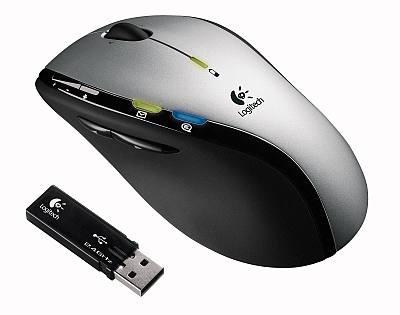
another good looking device - logitech mouse with bidirectional communication read more (german). It's the mouse I'm using these days and I'm totally happy with it. No review told us that the mouse also perfectly works with just 1 battery inserted! That reduces it's weight alot...