| browse: mobile | android | pc hardware | firefox | fun | music | .
Showing posts with label hardware. Show all posts

Saturday, August 31, 2013

Good Mouse for Photoshop

Which mouse is a good Photoshop Mouse? Simple answer:
Your best gaming mouse is also your best Photoshop mouse.

That is because gaming mice come with many fully configurable buttons and feature an ergonomic form for long sessions, they are precise and have durable build quality.

Remember: good mice and good keyboard boost your productivity more than a faster CPU does. So don't be obsessed on saving money when it comes to the mouse!
When working through series of pictures the right commands on the mouse can easily save you many hours of time!


Currently my favorite mouse for work is the Logitech G700. It's fully customizable and all buttons are placed where I like 'em.


The general approach to assign the mouse with actions:

- understand that this topic is highly individual
- observe your own Photoshop usage closely
- take notes of the actions you perform the most in your workflow

- decide which actions you want to access with a mouse click
- look up the corresponding keyboard shortcuts here or just google them
- configure your mouse , sometimes it's possible to form groups of actions (ie always the same 3 actions for picture tweaking form a cluster, place them on button G8 > G9 > G10)
- create a cheat sheet because things might be hard to memorize in the beginning

> get inspiration from the net! to tune up your workflows


Other tools which might make your Photoshop life easier are:
- a Surface Pro as an affordable alternative to the very expensive Wacom Cintiq
- a must: wacom tablet ($100+) for retouching and painting
- keyboard stickers for professionals (not for me, because I use around 15 shortcuts only)
- a gaming keyboard where you can assign more functions to shortcut keys (not for me either because they look childishly ugly most of the time)
- your tablet > see this older video. I don't have any experience with this


Here's my own cheat sheet from 2008 / Photoshop CS3
(uhm shortcut missing is Ctrl+T to show layer handles)


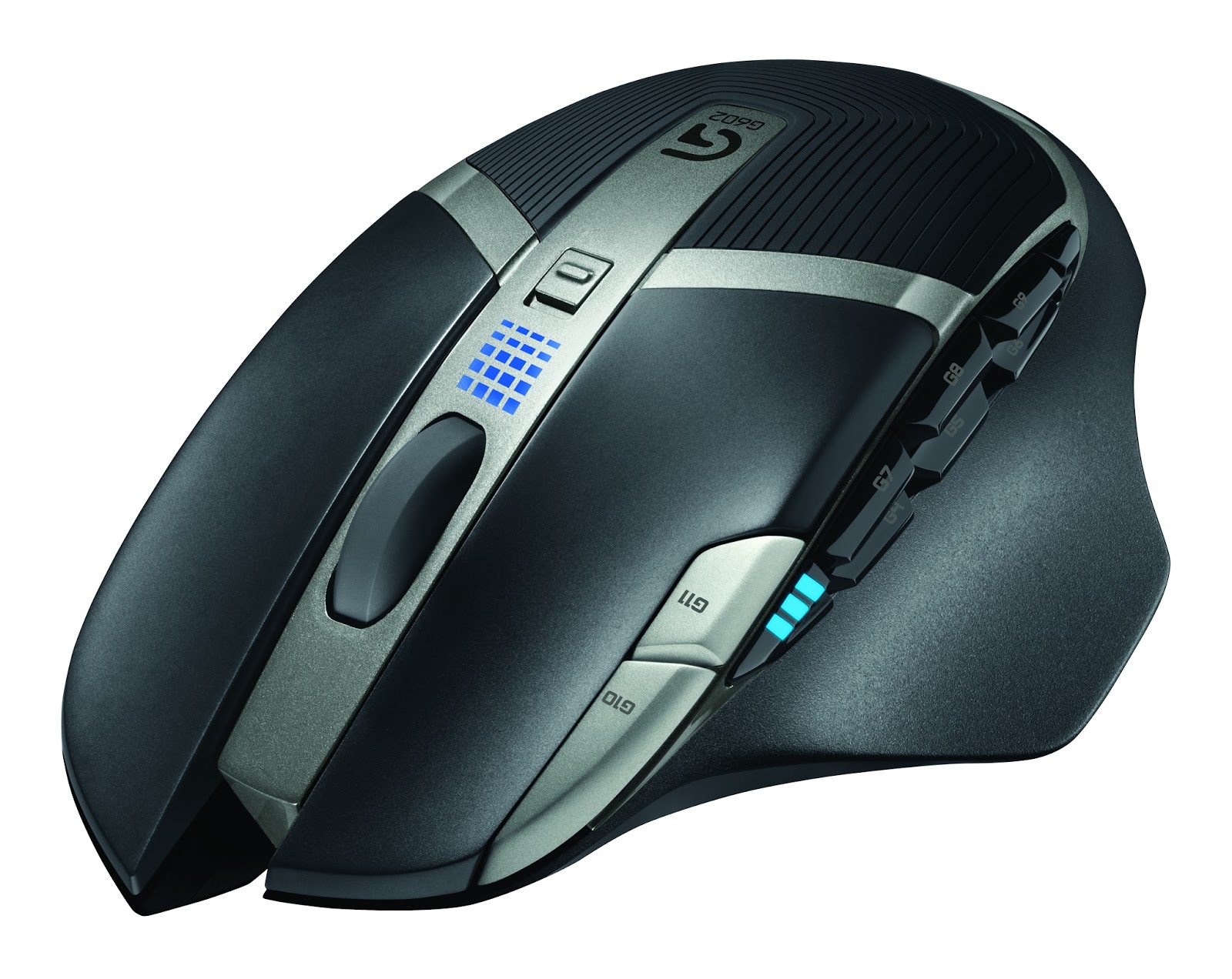
Logitech G602 Mouse announced

Some of you know that I use Logitech mice since 20 years now. To me the G700 and the Performance MX are close to perfect productivity boosters. The buttons are at the right place, the scroll wheel is phenomenal, the G700 driver an absolute charm.
Therefor I was rather excited to read about the new Logitech G602 mouse! Unfortunately the more I learn, the less happy I feel about the new product. First some pictures, then I'll explain.


source of all images above: logitech.com


My thoughts are:

+ many buttons
+ driver will allow full customization of all buttons
+ looks good and seems to feel ergonomic
+ many buttons
+ works with just one battery (to reduce weight)

+/- main feature long battery life - but has no meaning to me.
+/- I learned to be perfectly happy with G700s 1 day battery life

- four side thumb buttons are enough
- the mouse wheel is not tiltable
- no mouse wheel free spin
- for advertised capacity of 10 days high weight because of 2 batteries
- buttons G10 & G11 implementation inferior to G700
- meaningless laser and microswitch specs, because all competitors have it too
- Logitech please do some microswitch sealing instead
- nothing spectacular, nothing outstanding about it


Some of you might like 20 thumb buttons - it's a highly individual thing. I mainly use two or three profiles on my mice, one for work, one for gaming and a special Photoshop profile. It's a challenge  to remember all the button assignments if you don't use them everyday. Only good I see in many thumb buttons are the options for "push to talk"and the like.
If the G700 wouldn't exist then the G602 might be a good option. Well I have to see, what my kids have say about it.

Wednesday, September 12, 2012

Thai Keyboard Stickers (transparent)

For the interested - free of any deeper sense.

There's this little success story from summer 2011. Problem: our thai keyboard in the kitchen was a crappy, old, yellowed Logitech thingy. Didn't like it's clattering sound too.
Time to replace it with an excellent Digital Media Keyboard.

To add the Thai Kedmanee letters I ordered these stickers from 4keyboard hosted @amazon:
Delivery was fast, quality of the product great, its price very low.

Tuesday, January 10, 2012

Gainward gtx 560 ti Phantom noise

I just bought a Nvidia gtx 560 ti to be able to turn details up in BF3 1920x1200. Decided for Gainward Phantom because of good reviews for their cooling concept.
Performance and general noise levels are fantastic to say the least. But hey wait! What's this weird sound coming out of my rig while having any 3d app launched?? check out the vid.

Man - considering the additional charge for the Phantom series - that's disappointing. Friend has the same problem with his identical product too. We're not returning the card, because we both usually use headphones while in games.

At least I'm perfectly happy that the card's inaudible while working with regular apps - that is 90% of the time I'm using this comp.


Sunday, June 19, 2011

Samsung S24A450BW and S22A450BW

We are using Samsung Monitors for quite a while now. The overall experience we got for the money was always excellent. In June 2011 Samsung announced a new generation of monitors  > Series 4 business TFTs with LED backlight and 16:10 aspect ratio, models S24A450BW and S22A450BW.


images source: samsung.de

TFT/TN-Panel
1980*1200 S24A450BW
1680*1050 S22A450BW
very low switching times
matte panel, matte frame
 TCO5 certified | high adjustment flexibility
tilt -5° to +20° |  29W power usage
DVI-D, 15pin D-Sub (no hdmi, no display port)
full fact sheet (not yet avail in english)


The TN panel technology in use is very cheap because it's dominating the consumer market. IPS panels, S-PVA panels and so on offer better quality but usually lack fast response time. Lower production numbers and more sophisticated technology doubles prices in most cases.
So for most of us TN panels suffice. To avoid frustration, you should be aware of the downsides before ordering such a cheap monitor:
  • colour mixing happens with only 6bit per RGB channel, resulting in less available colours. TN panel builders use "dithering" to reduce the noticeability of the resulting effects. Often people only notice the lack of colors when being told. See here for more information.
  • limited viewing angles | but then again 97% of the time I sit in front of my comp alone - so I don't care about it. The colors remain enough stable to notice only very little color bleeding towards the edges.
  • Samsung suckz when it comes to older products. After a year they often switch from the good initial panel to cheaper AU Optronics panels - without changing the product name! So don't wait to long a time once the product has been announced.
BTW: Personally I would opt for 16:10 aspect ratio - because you get some extra height for  the task bar and menus. Movies aren't released in 16:9 either! wut? you didn't know?  2.39:1 and 1.85:1


If you want to buy a bigger 27" monitor with higher resolution, then I suggest having a look at the Samsung SyncMaster S27A850D. see pictures below.
Specs: 2560 * 1440 (16:9), PLS Panel (similar to IPS), LED, no hdmi, cheap!

more pictures here

Monday, January 17, 2011

der PC fürs 2011

Früher als erwartet sind alle Komponenten bereits lieferbar. Es geht hier wie immer nicht um einen Büro PC, sondern ein Teil für anspruchsvolle Anwender, die viele Videos schneiden und transkodieren, 3d Szenen bauen, Audio Tracks erzeugen und ab und zu ein modernes Spiel in 1920x1200 mit allen Details "on" spielen. Im Hintergrund läuft dauernd Mail, Winamp und ein uploader. Wer das alles nicht macht, soll auf keinen Fall so viel Geld ausgeben! (siehe einleitende Artikel hier und hier)
[achtung: am 31.01. wurde öffentlich, dass alle bisher produzierten neuen 6er Intel-Chipsätze einen Produktionsfehler aufweisen (B2 stepping) > betrifft die Langlebigkeit der ersten 4 SATA Schnittstellen. Fehler kann nur durch einen Motherboardaustausch behoben werden. Die noch zu produzierenden neuen B3 steppings dürften anfang April im Verkauf ankommen. siehe hier]


Bemerkungen: starke Übertakter müssen die K-Modelle nehmen. Interessiert mich nicht, da beim extremen Übertakten i.d.R. Speedstep & deeper C-States etc. ausgeschaltet werden. Speedstep, die Schlaf- und Turbo-Modi sind ja aber genau die extremst hohe Ingenieurskunst die wir wollten...
Update 16.04.11 > anders als ich dachte, funktioniert der Übertaktungsmechanismus für LGA1155 Sockel CPUs anders als bei den bisherigen Intel Chipsätzen. Statt dem Frontside Bus Takt zu erhöhen wird der Multiplikator in Einerschritten erhöht. Der grosse Vorteil: alle CPU Stromspar- und Turbomechanismen funktionieren weiterhin. Das war bei den 1156er Boards nicht so. Demnach spricht einiges für die K-Modelle. also i5 2500K (nur CHF 10 Aufpreis).

Mehr als 4GB RAM will auch jeder, selber ein Game besitzen das mehr als 2 GB Ram alloziert? meistens Fehlanzeige. Ausnahmen sind Hosts von virtuellen Maschinen: die schlucken unter Umständen sehr viel Speicher. Bei mehr als 4GB wird Win64bit Pflicht. Ein Win32 Betriebssystem kann wegen sich überlappenden Adressbereichen typischerweise lediglich 3 bis 3.3 GB Speicher nutzen.

Wichtig: wer die in der CPU eingebaute GPU nutzen möchte, muss ein H67 oder ein Z68 Motherboard organisieren, nicht ein P67 wie wir. Aber mit den H67-Boards kann man die CPU nicht übertakten, nur den GPU-Kern (und das bringt nix). Wer ein K-Modell kauft und die CPU übertakten will, muss zurzeit ein P67 Board kaufen! Und was ist mit dem Z68 Chipsatz? Hier kann man Übertakten und gleichzeitig die interne GPU nutzen und hat noch zwei, drei zusätzliche Gimmicks wie z.B. SSD Caching. Ich lass die Finger davon - wenn schon, dann grad auf SSD setzen, die interne GPU nutzt eh absolut niemand von uns.
Schade: viele viele Nutzer klagen bei den neuen Chipsätzen über Probleme mit dem S3 Standby Modus. Meistens ist ein dokumentierter Intel Microcode PLL OV Fehler die Ursache.

Thema SSD: wer das Geld hat, soll sich eine fürs System-Laufwerk C: besorgen. Dann für die Datentresore eine 2TB Disk einbauen. Bitte keine 3TB Disk. Viele Applikationen stolpern noch über diese Diskgrösse. Generell wird der SSD Effekt überschätzt - Speed ist zwar enorm, mit dem Resultat, dass der PC noch länger auf die erste Tastatureingabe des Anwenders wartet - CPU und GPU wirken viel nachhaltiger. Was aber an SSD super ist: sie sind absolut geräuschlos!

Bei mir geht das anders: schnelle 1TB HD für aktive Daten, zweite langsame 5400er 1.5TB Disk für Sicherungen und Schrott. Die komplexe SSD-Technik ist kompliziert und noch jung - die zugehörigen Microcode-News aber sehr spannend! Selber hätte ich lange nichts anderes als Intel verbaut, die Konkurrenz ist langsam auch robust.

aktualisiert 11.09.2011
CPU, Intel Core i5 2500K - 199
Board, ASUS P8P67 - 139
(kein SLI, in-Chip GPU nicht nutzbar)
(Alternative: Z68)
RAM, Patriot 2x 4GB / 79
HD Samsung F3 1TB - 59

GPU, Nvidia GTX560 TI - 249

DVD Writer / irgendwas -  29
(schreibt eh niemand mehr DVDs - BluRay)
Case, any Case u like / just any / really any - 58
Power, Cooler Ma / oder - 100
-------------------------------
totals ~ CHF 912.-


+
Windows 7 home prem 64bit deutsch - 95
Windows 7 home prem 64bit english - 95
Display, Samsung BX2440 - 279
Display, Samsung new s24a450bw
CPU-Cooler, AC Freezer - 39
very nice Keyboard - 37
very nice 5star Mouse - 79
5star Mouse with same hardware but more buttons - 90

.

Monday, January 03, 2011

Intel Core i5 Sandy Bridge


Update
15.01.11 > früher als erwartet sind z.B. bei Digitec schon alle CPUs und Motherboards lieferbar. Siehe auch den entsprechenden Einkaufstipp. / nicht vergessen: alle bis 25.01.11 produzierten H67 und P67 Chipsätze weisen einen Produktionsfehler auf. Fehlerfreie Produkte werden erst gegen Ende März erwartet.

Update 16.04.11 > anders als ich dachte, funktioniert der Übertaktungsmechanismus für LGA1155 Sockel CPUs anders als bei den bisherigen Intel Chipsätzen. Statt dem Frontside Bus Takt zu erhöhen wird der Multiplikator in Einerschritten erhöht. Der grosse Vorteil: alle CPU Stromspar- und Turbomechanismen funktionieren weiterhin. Das war bei den 1156 Boards nicht so. Demnach spricht einiges für die K-Modelle. also i5 2500K (nur CHF 10 Aufpreis)

Die NDAs sind abgelaufen, ab heute dürfen nun alle über die neuen Core i5 und Core i7 berichten was das Zeugs hält... Aber allzuviel müsst ihr dazu eigentlich nicht lesen gehen, denn für jene Gruppe von Usern welche diese Programme einsetzen gibt es keine Alternative!
Man kann quasi bedenkenlos zugreifen - einzig bei der Wahl des Motherboards wird es noch ein wenig spannend. In ein paar Stichworten zusammengefasst:
  • CPU Sockel LGA1155  :-(
  • neuer GPU Teil liefert noch immer nicht die Leistung einer $60 Grafikkarte :-(
  • neuer zugehöriger Intel Chipsatz noch ohne USB 3.0, jedes Motherboard wird eine andere Lösung dieses "Problems" präsentieren
  • erstaunlich mehr Speed > sehr hohe Taktraten, bei niedrigem Stromverbrauch (fast unglaublich)
  • der bisher exzellent funktionierende Turbo Modus wurde noch verbessert (burst mode)
  • die CPUs sind günstig > beste Preis/Leistung haben wohl Core i5 2400 & 2500
  • Beispiel-Motherboard: Asus P8P67 > bereits unsere P7P55-Boards für die erste Core i5 Generation waren sensationel robust plus der zughörige Treiberservice bei Asus.com war die letzten 2 Jahre tip top. (die Austauschprogramme für die erste, schlechte Charge laufen sauber)
  • NIC des Chipsatzes bietet nun Jumbo Frame Support (haha)

Hier gibt's eine gute kurzweilige Zusammenfassung: Heise  
mehr Links zu englischsprachigen Reviews folgen später
Core i5 GPU Performance (Techpowerup)
.
.

Sunday, December 05, 2010

Kein neuer PC mehr

Update 15.01.11 > früher als Erwartet sind z.B. bei Digitec schon alle CPUs und Motherboards lieferbar, siehe auch den entsprechenden Einkaufstipp.

Die nächsten drei Monate würde ich keinen neuen PC kaufen. Grund: Intel wird im Januar die Nachfolge-Prozessoren der aktuellen Core-i5 und Core-i7 CPUs vorstellen (Sockel 1155). Die neuen CPUs basieren auf dem Kern der Sandy-Bridge Linie. Neben dem höheren Takt dünkt mich AVX und der niedrige Stromverbrauch (leise Kühlung) nennenswert.
Mir geht's immer darum, nicht zum Schluss einer Produktegeneration noch neu einzusteigen, denn meistens bereut man das später. Bei Version 1.0 zu starten ist in der Regel auch schlecht, aber bei Intel riskiert man seit vier Jahren wenig.


my core i5 750

Bekanntlich entwickelt auch Intel ihre Produkte seit Jahren in einem Tick-Tock Zyklus > Tick heisst bestehende Technologie wird verbessert und "ge-shrinked" (shrinking bedeutet praktisch immer, höhere Taktraten bei niedrigerem Stromverbrauch) - Tock heisst: neue Generation, neue Funktionen. Im Januar ist Tock dran;  man darf von einem extrem ausgereiften Produkt ausgehen, da praktisch alle Desktop Intel-CPUs seit Nehalem so gut wie keine Schwächen aufweisen. Hoffen wir, dass die verbreiteten Compiler rasch nachziehen, sonst macht AVX wenig Sinn.
übrigens: Nvidia hat vor zwei Monaten mit der GF110 (gtx580) ihren "Tick" released und so den misratenen "Tock" GF100 (gtx480/gtx470) ausgebügelt - das Die wurde allerdings nicht ge-shrinkt.

source: canardpc

Auch ein Intel-Chipsatz der Generation 6 kündigt sich an, so dass mir ab Februar/März folgende Konfiguration für Power-User sinnvoll scheint:

CPU: Intel Core i5 2500 - 4 Kerne - 3,3 / 3,7 GHZ - 6 MB Cache- 95W tdp - kein HT
MB: Asus P8P67 (Intel Generation 6 Chipsatz, leider ohne native USB3)
Ram: 4 GB > niemand von euch braucht mehr...
GPU: Nvidia GTX 570 / GTX 560 Auch dieses Teil wird erst noch angekündigt werden.
SSD ja/nein? Speed ist super, aber Preis/Leistung ist für mich noch nicht im grünen Bereich.

> statt einer SSD lieber eine zweite 2 TB-Platte um ein einigermassen anständiges Backup zu erstellen.

(image source: Malaysia)


Mit einer solchen Konfig hat man die nächsten 3 bis 4 Jahre mehr als genug Performance! Alle Apps werden zügig laufen, praktisch alle Spiele werden bis 1920x1200 mit max. Details flüssig bleiben, Einschaltzeit aus dem extrem sparsamen S3 Standby Modus beträgt 5 Sekunden UND vor allem wird das Teil leise kühlbar sein.
Dann? Mitte 2012 eine SSD einbauen und alles wird einen Schluck besser. Anfang 2013 steht dann Haswell in den Startlöchern: 8 Kerne Default, 22nm, neue Energiespartechniken, UEFI und und und

Thursday, October 07, 2010

Google TV and Logitech Revue


I'm looking forward to the merger of TV and internet for a while now. While current solutions just provide a faint display of possibilities, Google TV seems to head in the right direction.


Finally the marketing campaigns for Google TV and Logitech Revue have been launched. Below I added some links to give you a jump start into the topic.

I'm sure that "3D" won't have a big impact on TV for the next two to three years, because the technology still isn't mature (lots of flickering) and there's simply no 3D content available! At this moment only three 3D Blue Ray movies are sold in Germany/Switzerland - and hardware prices are still very high. 3D is fun at the movies and that's where we will consume that form of motion picture in the coming days.


But there's a lot of media available on the internet already! I care much much more about accessing media on the net and most of it is free of charge.
We all know that YouTube is muuuch better than MTV for music and that our kids love video search results from "Tom and Jerry" or "Mister Bean Animated" > it all plays without commercial breaks, episodes you don't like can be skipped with one click.
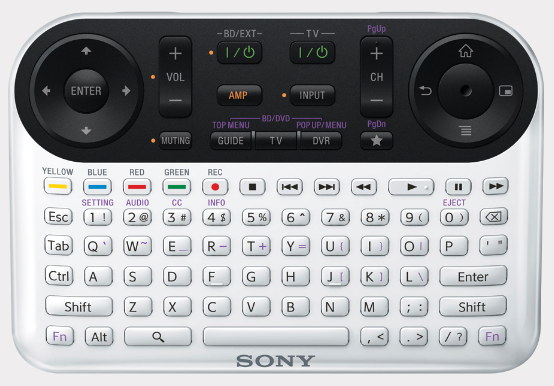
We already watch a lot of YouTube on our Sony Bravia TVs and it works surprisingly well (KDL-40EX710). But I miss a keyboard, YouTube HD support and a normal web browser ... and that's where the new products will hopefully jump in. And nope, our excellent WD TV Live can't fill the gap. More about that later.


Google TV - Quick Tour
Logitech Revue - explained on the US site $300
Google TV hands on video, also showing controls through iphone / android app
Logitech Revue getting mixed reviews

Mixed Reviews? Yes the market is getting crowded but come on, apple tv? Apple is evil! Nope I won't explain myself. It's not really the Logitech Revue I'm looking forward to, but Google TV instead. I think the concept points to the right direction, so let's keep track with the coming product announcements. That's all we Europeans can do for now :-)
BTW: a Filet-O-Fish costs $5.50 where I live, so we ain't no penny pinchers.


BTW > the device is driven by a Intel Atom CE4100, supports wireless 802.11a/b/g/n, ethernet 10/100 Base-T and uses Logitech Unifying wireless technology
(image source: logitech en-us press)


And what's about Sony's version of Google TV? They'll release a TV and a Blu-Ray Ray Player with built-in processors and RAM. Check out their site for some impressions


Thursday, August 05, 2010

Logitech G700 Mouse announced

Some of you know that I'm using a Performance MX Mouse almost a year now. It's close to perfect - really.
Today Logitech announced the tuned up version G700 > comes with 13 customizable buttons instead of just 9 and with higher transfer/report frequency. While I can't care less about the (nonsense) features specifically designed for gamers? I'm often in need for many mouse buttons while working series of hundreds of pictures in Photoshop.

[Update Aug 2011: just bought a G700. While the design and the driver's usability are perfect, I dislike that on the side we're dealing with a hard, cheap feeling, rough plastic, where the Performance MX offers a much higher perceived value by it's soft and slightly 'rubberish' shell.
Everybody intending to use the included USB cable should be aware, that it's relatively rigid. Pleasant surprise: tilting the mouse wheel left an right triggers a clean click - better than the analogue sampling introduced with the Performance MX. btw you can also run the mouse without having the battery inserted, so it's cord vs. weight  /end]

under exposed to give you an idea of the rough surface

Have a look at the pictures, the mouse looks really good and the buttons are placed where I love it. That's the main reason for me to report the mouse. Maybe I'll get one for my kids? For their Photoshop course I mean - lol


(image source: logitech.com)

Remember: in the normal consumer Logitech products you can only assign custom key functions to all buttons by using uberoptions (or manually tweaking the xml files), whereas in the gamer products such as this G700 you can assign custom functions to more and every button right out of the box.
In the driver you can create as many button profile sets as you like, three of them are stored in the mouse itself.
The pictures explain it all:


Logitech G700 & Performance MX


Specs taken from their site:
- 13 customizable buttons
- 200 - 5700 dpi
- dpi can be changed in 5 steps, you can freely assign a value per step
- report rate or polling rate: up to 1000 Hz (steps are: 125, 200, 250, 333, 500, 1000)
- weight 145 g (reports also state 151g), 128g if you run it without the battery
- only one AA battery max, eNiTime 1.2V, 2000mAh
- no customizable weights
- 

Reviews and pictures:
design
Lesnumerics.com
crunchgear.com
engadget.com (pics)

Tuesday, July 13, 2010

Nvidia GTX 460 released

Finally the Nvidia DX11 product we've been waiting for has arrived. Placed at the $200 limit (digitec CHF 230.-) and with very low idle power consumption.

- decent performance
- very quiet
- very cheap! (768MB version, FPS per $ already at first day of release)


Read techpowerup's conclusion for an overview. If you want a really quiet GTX 460 then make sure that you'll get yourself Nvidia's reference board design!

You might also want to check out the benchmarks at Anandtech. While I tend to disagree with their rather pessimistic conclusion (768 vs. 1024 MB), it's still a good thing to check out figures from a different source.

Update Sep/2010: GTX 460 and GTS 450 With the release of driver 260.63 the audio formats DTS-HD and Dolby TrueHD can now be transmitted through HDMI (compressed). With every driver release functions are being added. While you don't need most of the new features you're certainly interested in the game's performance gain (5 to 15%), so keep the drivers up to date regularly.

Saturday, March 27, 2010

Nvidia GTX 480 and 470 reviews

oh boy 6 months late, the cards are finally available. Reviews are posted all over the net as of now... results are rather disappointing! GTX 480 to hot, to loud. Oh damn according to anandtech even the GTX 470 seems to be hotter and louder than any 5800 ATI out there. Update June 2010: at least in europe prices for GTX 470 dropped a lot. They cost only about 10% more than ATI's 5850. Also check out the GTX 460!

Some facts:
  • GTX 480 is currently the fastest single GPU solution available, beating ATI 5870 performance by about 10-15%
  • GTX 470 is just around 5% faster than a ATI 5850 but also costs a bit more more
  • GTX 480 ($499) an is about 25% faster than GTX 470 (around $350)
  • relevant to me, DX10 Modern Warfare 2 at 1920*1200 with 4xAA > well here the difference is 20-30% in favor for the Nvidia products. That's not bad! (uuh in other reviews the cards are on par...)

Reviews: GTX 480 and 470 Anandtech and at tomshardware, GTX 480 at techpowerup, GTX 480 at Golem.de und heise.de

Preise in Deutschland
Preise in der Schweiz: GTX 470 > vorher CHF 450.- Juni 2010: akzeptable CHF 400  /  GTX 480 > kranke CHF 600.-

Since ATI demands are still said to be very high, their prices won't drop fast either. I guess I'm looking forward to something like GTX 485 and GTX 475 where some of the problems might have been addressed? For people playing in lower resolution than 1920*1200 or without turning all details to the max, the GTX 460 seems to be a good solution at prices around CHF 225.-


1min Video demonstrating gtx 480 loudness lmao

Tuesday, March 16, 2010

Logitech mouse click not working

After years we all faced the following problems with all our Logitech mice...
  • double click not working anymore
  • left click hardly ever working
  • click-dragging resulting in unpredictable results
  • single mouse click registered as double click
  • etc.
In most cases we just have to clean the inside of the micro-switch and all problems vanish. My 6 yrs old son helped me out this time:


important: read the comments before you disassemble anything.
sometimes you solve the situation by just blowing into the mouse.
or by following these Logitech instructions:  trapped static energy

also: you will void your warranty by going through this.
In my case? ...couldn't care less, the pictured mouse is from 2007.

I'd say the pictures are self-explanatory, some of you might want to remove the battery as the starting step.
Richard has some more information posted here, plus there's another site with similar info and more pictures. I hope this was useful...

.

Logitech Set Point 6 released

By the end of February Logitech released Set Point 6. Still a 00 release but it already seems to work quite fine at my place.
It now implements the drivers "Productivity" and the "Gamer" branch under one hood and has a modular update system.

Also in the new release my Performance MX mouse buttons 6 and 9 can't be assigned custom functions. But once again we're lucky enough and Richard's uberoptions adds the value we desire. (Update June 2010: currently I'm not able to apply uberoptions to a fresh windows 7 setup. So I also had to revert back to Setpoint 4.8 - tiresome)

Just take note, that after having installed uberoptions the new OSDs won't fully work yet (volume and font).
During uberoptions installation you have to make sure to feed the installer with the new Setpoint paths. For Windows 7 32bit & 64bit those are
C:\Program Files\Logitech\SetPointP
C:\ProgramData\LogiShrd\SetPointP\Devices

(old vs new notification area icon)


In general v6 looks really good and seems to head into the right direction. Important to some: the new release currently features less wheel options! Some KB/Mouse combos are not fully supported yet.

In their forum you'll find the release notes and some comments. But before you download anything - make sure to save your current configuration user.xml found in %appdata%\Logitech\SetPoint\ it might be helpful in the process.


some facts:
  • New Driver Version for Productivity branch is 4.90.80 / up till now we used the fine 4.82.11. Driver Version for Gamer branch is 5.3 (old drivers can be found on Logitech's ftp server)
  • new install file: 24 MB / old install package: 67 MB
  • I never cared much about the huge installer, the memory footprint is more important and in my case I can't report anything really bad. With SetPoint v6, just the mouse, I read khalmnpr.exe 4.8 MB, Setpoint.exe 4.8 MB
  • In the new release OSD functionality was cut > now only displays volume, mute, play/pause, caps on/off but no longer application names

some screenshots:

Above's screenshot shows the new App Override dialog. Basically works like the previous one.
Below: the new OSD looks much better:


Gamers might be interested in this Logitech Forum Thread.

Changes from earlier versions of SetPoint:
  • The download size has been reduced by approximately 60%. This has been achieved by streamlining the code and removing device pictures from the download package. SetPoint will automatically download pictures in the background for devices that are connected to your system.
  • SetPoint 6.0 includes the control panels for standard mice and keyboards (previously supported in SetPoint 4.x) and gaming mice (previously supported in SetPoint 5.x). This reduces duplication of system components, resulting in a smaller overall installation size.
  • The SetPoint control panel for standard mice and keyboards has been updated with a new appearance.
  • Numerous bug fixes and stability enhancements have been made in SetPoint 6.0